See today clearly
Give owners, office staff, and cleaners a focused view of scheduled visits, progress, and work needing attention.
Cleaning scheduling software
Plan one-time and repeat visits, assign cleaners, and keep the right instructions with each job. See what is scheduled, in progress, or ready for review.
30 days free · no credit card required
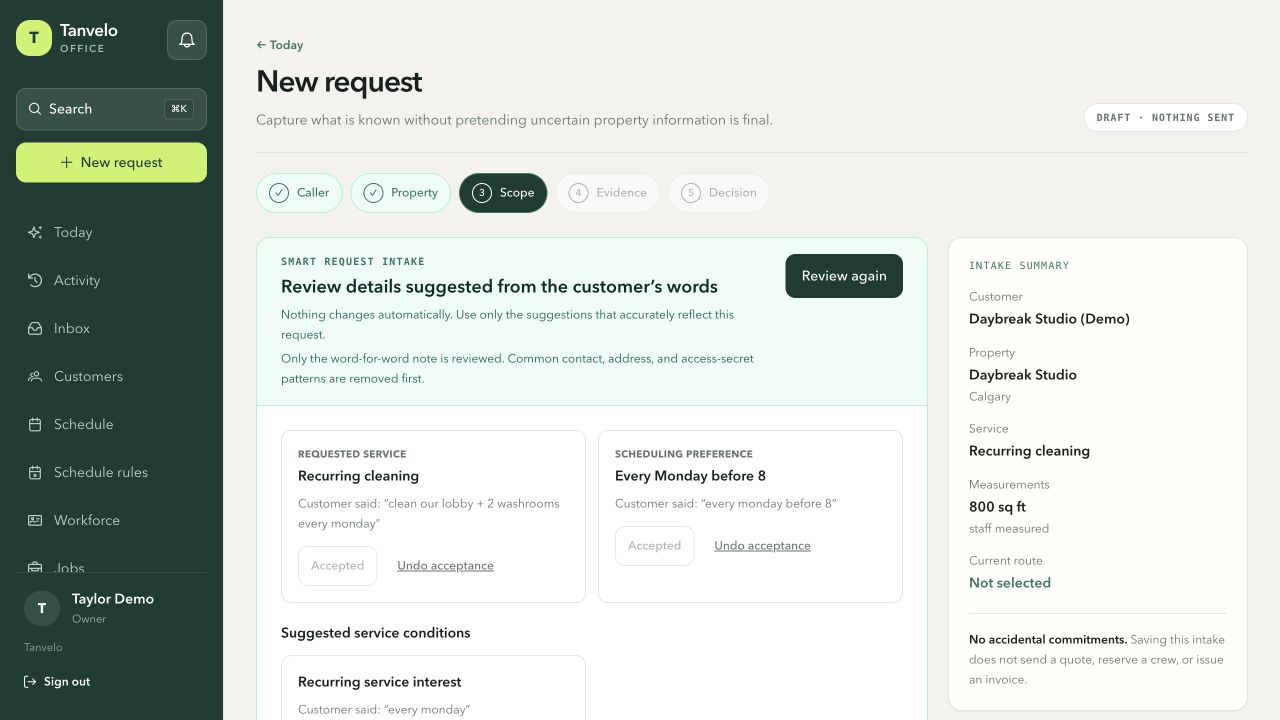
A real request-intake screen showing a recurring service and its preferred time. This is the preparation step, not a confirmed calendar booking. Fictional demo data.
View full-size screenshot (opens in a new tab)Give owners, office staff, and cleaners a focused view of scheduled visits, progress, and work needing attention.
Keep recurring service connected to the property and scope instead of rebuilding the instructions for every visit.
Put access notes, customer priorities, timing, checklists, and proof requirements beside the scheduled job.
A practical example
A recurring Tuesday visit needs more than a calendar block. The cleaner needs the right entrance, the approved areas, the expected checklist, and the proof the office reviews after every occurrence.
Connect the Tuesday time to the customer, exact property, agreed work, and assigned cleaner.
Access notes, customer priorities, checklist steps, and proof expectations appear with the active visit.
Follow this Tuesday's work through in progress, submitted, returned, or completed without losing the recurring schedule.
From calendar to completion
A date and time are only part of a cleaning visit. Tanvelo links the schedule to what was promised and what must happen next.
Schedule against the correct service location so access details and operational history remain available.
Plan the visit with its agreed scope and use recurring work for services that repeat.
Follow the job through in-progress work, checklist completion, proof review, exceptions, and billing readiness.
Inside Tanvelo
The schedule stays useful because the field and office can work from the same underlying job record.
Organize individual jobs and repeating service without separating the schedule from customer and property context. Coordinating repeat building work? Keep each facility's service pattern, access notes, and assigned crew clear.
Explore recurring janitorial schedulesShow assigned cleaners the timing, location, access notes, scope, and required next steps for their work.
See what is scheduled, in progress, awaiting review, or ready to move forward.
Keep approved extra work and later decisions connected to the original visit rather than hiding them in messages.
Built for cleaning work
Tanvelo fits teams that need more than a shared calendar but do not want a heavyweight system dictating how they work.
Know before you switch
Handle invoicing, mobile work, reminders, and bookkeeping without losing the job details.
Create customer invoices and keep payments, outstanding balances, and job records organized in one place.
Open Tanvelo in your browser on desktop or phone. Keep the office and field team working from the same job details.
Plan recurring visits, assign a lead or crew, and enable customer appointment reminders by email in your schedule settings.
Keep payment records organized and export reconciliation details as CSV for your bookkeeping process.
Have a question? Talk to us about your workflow.
Questions and answers
Clear answers about where Tanvelo fits and how to start.
Yes. You can add recurring work so repeated visits stay connected to the customer, property, and service context.
Assigned work can include timing, property and access context, agreed scope, checklist items, customer priorities, and proof requirements.
Yes. You can enable appointment reminders by email and choose the lead time in schedule settings. SMS reminders are not included.
No. The office plans and assigns work. Customers can request appointment changes for office review, but Tanvelo does not automatically optimize driving routes or let customers instantly reserve calendar slots.
Start without a sales call
Create your workspace, add a customer, schedule the work, and see how the full trail stays connected.